
Forecasts are something of an afterthought for most Salesforce implementations. The focus for new CRM users tends to be on giving users a tool to ‘manage’ the Sales process. Reporting and tracking sales metrics is often less of a priority; but it really is essential at a strategic level for businesses that are serious about growth.
Forecasts are a ‘ready made’ reporting tool for Opportunities. They allow users to view open opportunities that are set to close during the forecast period (which is customisable) and sliced by month or quarter. Rather than reflecting the various (and many) opportunity ‘stages’ that are configured for your instance, forecasts use ‘Forecast Categories’ to summarise the status of the opportunities more broadly.
Forecasts will provide a view based on categorisations like ‘Closed’, ‘Commit’ or ‘Best Case’; allowing users to quickly get a handle on which opportunities are ‘real’.
Forecasts are based on a user hierarchy, which supports team-based working and ensures that users only see their opportunities and the opportunities of their direct reports.
When reviewing forecasts, users can quickly edit values ‘on the fly’; making forecasts a perfect tool for collaborative review sessions. Managers can use forecasts to quickly scan through and sanity-check opportunities with their team and make edits to the amount or close date (and other fields) as required.
Quotas are effectively a ‘bet’ (usually an educated guess!) as to the revenue that a business will generate over the forecast period. They are an essential part of budgeting for mature businesses that target growth.
Quotas in Salesforce allow managers to define a split of organisational revenue across the team members. You can split the amount equally by users or, more likely, based on prior performance.
Whilst businesses are often nervous about devising quotas, they are an essential part of setting intention. Budgets and quotas will often be wrong, but it’s better to guess than to omit to go through the process at all.
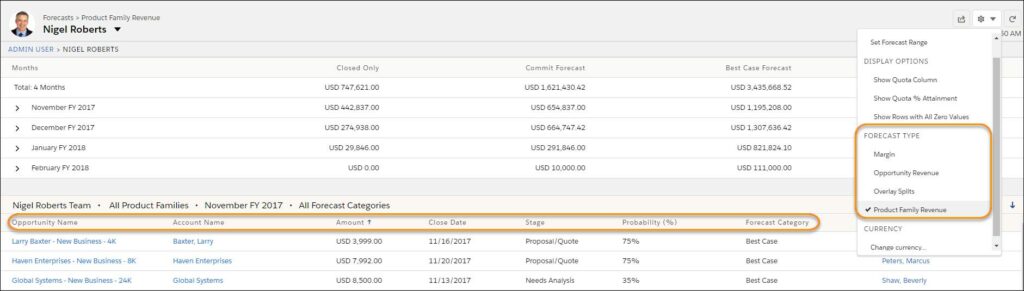
Adjustments are a way of providing context on the certainty of the pipeline, without necessarily challenging the detail of the underlying opportunity. It’s not uncommon for users to tend towards an optimistic or a pessimistic outlook when it comes to setting the opportunity amount or close date.
For the self-aware user, there is the option to dial up or dial down their own forecast, based on what they know about their typical forecast versus historic actuals. More typically, the adjustment process is something that a line manager will undertake before reporting the forecast to more senior managers.
Forecasts can be used as a reportable object in the standard reports and dashboards tool, giving users the ability to see forecasts represented graphically.
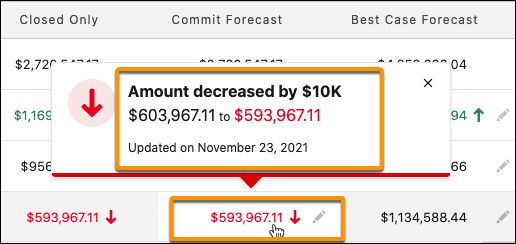
The Spring ‘22 release of Sales Cloud brings some updates to Forecasts, including:
The value of forecasting can’t be understated. It doesn’t necessarily need to be something that is exclusive to large organisations; it’s good practice for all businesses.
Forecasting in Salesforce is a great way to collaborate around revenue predictions. If your users know that Salesforce is the ‘source of truth’ for pipeline, they are more likely to ensure accuracy.
With the new improvements, Forecasts are a fantastic tool and something to leverage wherever possible.
For help and advice on implementing forecasts (and everything else Sales Cloud), contact info@appdraft.com